Showing posts with label Performance Tuning. Show all posts

Wednesday, April 16, 2014

How to Avoiding row migration ?

When we update a row and it does not fit entirely within the original database block due to the corresponding growth in size, we have a row migration. In the original place (where the row was stored) we have placed a pointer to the new location of the row.

1.  Create the table BIG_ROWS:

CREATE TABLE HR.BIG_ROWS (
id number NOT NULL,
field1 char(2000) DEFAULT 'A' NOT NULL,
field2 char(2000), 
field3 char(2000),
field4 char(1000),
constraint PK_BIG_ROWS primary key (ID)) 
TABLESPACE USERS PCTFREE 10;

2.  Populate the table:

INSERT INTO HR.BIG_ROWS (id) select rownum from all_objects where rownum < 101;

3.  Analyze the table to refresh the statistics:

ANALYZE TABLE HR.BIG_ROWS COMPUTE STATISTICS;

4.  Verify if there are migrated rows:

SELECT CHAIN_CNT FROM ALL_TABLES 
WHERE OWNER = 'HR' AND TABLE_NAME = 'BIG_ROWS';


5.  In the next screenshot, we can see the results of these operations:
6.  Update some data in the table:

UPDATE HR.BIG_ROWS SET field2 = 'B', field3 = 'C', field4 = 'D' WHERE MOD(id, 2) = 1;

7.  Analyze the table to refresh the statistics:

ANALYZE TABLE HR.BIG_ROWS COMPUTE STATISTICS;

8.  Verify if there are migrated rows:

SELECT CHAIN_CNT FROM ALL_TABLES 
WHERE OWNER = 'HR' AND TABLE_NAME = 'BIG_ROWS';

9. Create table CHAINED_ROWS:

create table HR.CHAINED_ROWS (
owner_name varchar2(30),
table_name varchar2(30),
cluster_name varchar2(30),
partition_name varchar2(30),
subpartition_name varchar2(30),
head_rowid rowid, 
analyze_timestamp date);

10. Analyze the table to list the migrated rows:

ANALYZE TABLE HR.BIG_ROWS LIST CHAINED ROWS INTO HR.CHAINED_ROWS;

11. Count (or list) the migrated rows:

SELECT COUNT(*) FROM HR.CHAINED_ROWS;

12. In the next screenshot, we can see the results of these operations:
13. Create a temporary table, which is an empty copy of BIG_ROWS:

CREATE GLOBAL TEMPORARY TABLE HR.TEMP_BIG_ROWS as select * FROM HR.BIG_ROWS WHERE 1=0;

14. Copy the migrated rows to the temporary table:

INSERT INTO TEMP_BIG_ROWS SELECT B.* FROM HR.BIG_ROWS B, HR.CHAINED_ROWS T WHERE T.OWNER_NAME = 'HR' AND T.TABLE_NAME = 'BIG_ROWS' AND T.HEAD_ROWID = B.ROWID;

15. Delete the migrated rows from the BIG_ROWS table:

DELETE FROM HR.BIG_ROWS B WHERE EXISTS (SELECT T.ROWID FROM HR.CHAINED_ROWS T WHERE T.OWNER_NAME = 'HR' AND T.TABLE_NAME = 'BIG_ROWS' AND T.HEAD_ROWID = B.ROWID);

17.  Copy the migrated rows from the temporary table back to the BIG_ROWS table:

INSERT INTO HR.BIG_ROWS SELECT * FROM HR.TEMP_BIG_ROWS;

17. Analyze the table to refresh the statistics:

ANALYZE TABLE HR.BIG_ROWS COMPUTE STATISTICS;

18. Verify if there are migrated rows:

SELECT CHAIN_CNT FROM ALL_TABLES 
WHERE OWNER = 'HR' AND TABLE_NAME = 'BIG_ROWS';

19. In the next screenshot, we can see the results of these operations:

20. Drop the tables used for testing:

DROP TABLE HR.TEMP_BIG_ROWS;
DROP TABLE HR.CHAINED_ROWS;
DROP TABLE HR.BIG_ROWS;

How to Avoiding row chaining ?

We encounter row chaining when the size of the row data is larger than the size of the database block used to store it. In this situation, the row is split across more than one database block, so, to read it we need to access more than one database block, resulting in greater I/O.

Before we can start, we have to alter an initialization parameter of the test database (assuming the default block size is 8KB in the test database):

ALTER SYSTEM SET db_16k_cache_size = 16m scope=both;


We need to set this parameter to allocate a memory buffer dedicated to storing database blocks of a different size; in this recipe, we will create a tablespace using a 16KB block size, so we need the corresponding buffer allocated to use it.


We will examine how to detect row chaining issues, and how to avoid chaining in our tables. Follow these steps:
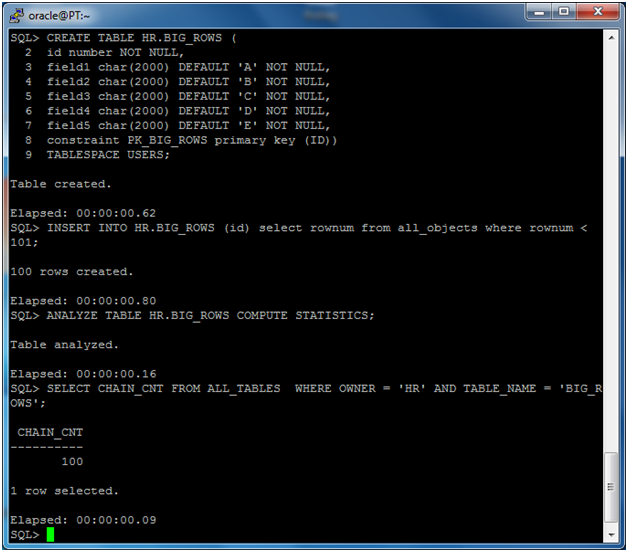
1.  Create the table BIG_ROWS:

CREATE TABLE HR.BIG_ROWS (
id number NOT NULL,
field1 char(2000) DEFAULT 'A' NOT NULL,
field2 char(2000) DEFAULT 'B' NOT NULL,
 field3 char(2000) DEFAULT 'C' NOT NULL,
field4 char(2000) DEFAULT 'D' NOT NULL,
field5 char(2000) DEFAULT 'E' NOT NULL,
constraint PK_BIG_ROWS primary key (ID)) 
TABLESPACE USERS;

2.  Populate the table:

INSERT INTO HR.BIG_ROWS (id) select rownum from all_objects where rownum < 101;

3.  Analyze the table to refresh the statistics:

ANALYZE TABLE HR.BIG_ROWS COMPUTE STATISTICS;

4.  Verify if there are chained rows:

SELECT CHAIN_CNT FROM ALL_TABLES  
WHERE OWNER = ‘HR’ AND TABLE_NAME = ‘BIG_ROWS’;

5.  In the next screenshot, we can see the results of these operations:

6.  Create a tablespace with a different block size:

CREATE TABLESPACE TS_16K BLOCKSIZE 16K  DATAFILE '/u01/app/oracle/oradata/orcl/TS_16K.DBF' SIZE 10M 
EXTENT MANAGEMENT LOCAL UNIFORM SIZE 1M;

7.  Move the table BIG_ROWSto the tablespace just created:

ALTER TABLE HR.BIG_ROWS MOVE TABLESPACE TS_16K;

8.  Rebuild the indexes, as they are unusable after the move:

ALTER INDEX HR.PK_BIG_ROWS REBUILD;

9. Analyze the table to refresh the statistics:

ANALYZE TABLE HR.BIG_ROWS COMPUTE STATISTICS;

10. Verify if there are chained rows.

SELECT CHAIN_CNT FROM ALL_TABLES 
WHERE OWNER = 'HR' AND TABLE_NAME = 'BIG_ROWS';

11. In the next screenshot, we can see the results of these operations:

12. Drop the tablespace and the table:

DROP TABLESPACE TS_16K INCLUDING CONTENTS AND DATAFILES;

We have created the table BIG_ROWSin which row length is greater than 8 Kbytes, the DB block size value for the tablespace USERS of ORCL.

We have populated this table with 100 rows, and after analyzing the table we know that there are 100 chained rows. A chained row is a row which cannot fit into one DB block, due to its size (when inserted or updated). So the database engine stores the initial part of the row in a DB block, which is chained to another DB block where the remaining part of the row content is stored.

To avoid chained rows, we can move the table to a tablespace with a greater DB block size; we have created the tablespace TS_16Kwith a block size of 16K, greater than the average row length of the BIG_ROWS table.

We have moved the BIG_ROWS table to the newly created tablespace and rebuilt the primary key index—which is marked unusable after the move. We then analyzed the table again to refresh the statistics.
After the move, the chained rows have disappeared from the BIG_ROWS table.

We can use different block sizes in the Oracle database, but every tablespace can have only one block size. Before adding a tablespace with a different DB block size, we have to make room in the database buffer cache to store DB blocks of every size, as we have done in the Getting readysection of this recipe.

As stated earlier, row chaining occurs when the database block size isn't big enough to store a row entirely. In such cases, the only solution to avoid row chaining is to move the table to a tablespace with a bigger DB block size, as we have done.

After moving the table, we had to rebuild the index. Why?

The answer is simple. An index contains the ROWIDs of the table rows, and the ROWIDs identify the position of the row, madeup by the object, the datafile, the block number, and the slot (row) number. When we move a table, the datafile and the block number change, so the indexes have to be rebuilt.